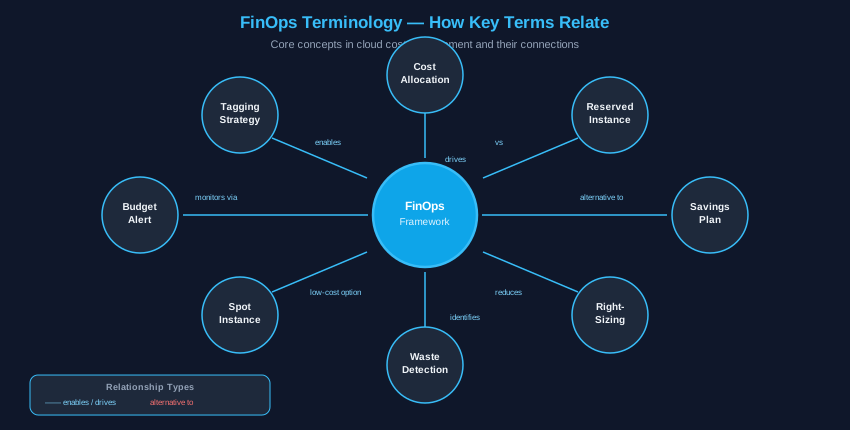
The FinOps Foundation defines three maturity stages. Each maps to specific tooling and process changes. The goal at every stage is accountability: knowing who spends what, and why.
Stage
Focus
Key Actions
Typical Time
Crawl
Visibility
Cost baseline, tagging schema, idle resource scan
0–30 days
Walk
Optimization
RI/Savings Plan purchase, right-sizing, budget alerts
If average CPU is below 40% over a 30-day baseline, the instance is oversized. Industry data shows 60–70% of cloud instances run at 2× required capacity.
Export CPU + memory metrics from CloudWatch / Azure Monitor / GCP Monitoring
Identify instances with < 40% avg CPU over 30 days
Test at target size before terminating original instance
Make one change at a time to attribute performance correctly
Set a monitoring alert on the new instance before closing the old one
[ AdSense Slot 1 — top of content ]
03Reserved Instances vs. Savings Plans[ COMMITMENT REQUIRED ]
Feature
Savings Plans
Reserved Instances
Flexibility
High — any instance family, OS, AZ
Low — specific instance type + AZ
Discount
Up to 72% vs on-demand
Up to 75% vs on-demand
Commitment
1-yr or 3-yr USD amount
1-yr or 3-yr specific instance
Best for
Baseline predictable workload
Stable critical production
Recommendation: Start with a Compute Savings Plan for baseline workload. Layer specific RIs for your most stable, highest-utilization instances.
04Spot Instances for Fault-Tolerant Workloads[ BATCH / CI-CD ]
Provider
Max Discount
Use Case
AWS EC2 Spot
60–91% off
Batch processing, CI/CD agents
Azure Spot
Up to 90% off
Data pipelines, rendering
GCP Spot / Preemptible
Up to 91% off
Non-production workloads
Do NOT use spot for: databases, persistent APIs, any workload requiring consistent uptime.
05Storage Tiering[ LIFECYCLE POLICIES ]
Tier
Access
Cost
Retrieval Delay
Hot / Standard
Real-time
Baseline
None
Cool / Infrequent
Monthly
–40–60% storage
Hours
Archive / Cold
Quarterly
–70–80% storage
12–48 hours
Glacier / Deep Archive
Annual
–95% storage
Hours to days
Implement lifecycle policies to auto-transition: Hot → Cool (90d) → Cool → Glacier (1yr) → Glacier → Deep Archive (3yr)
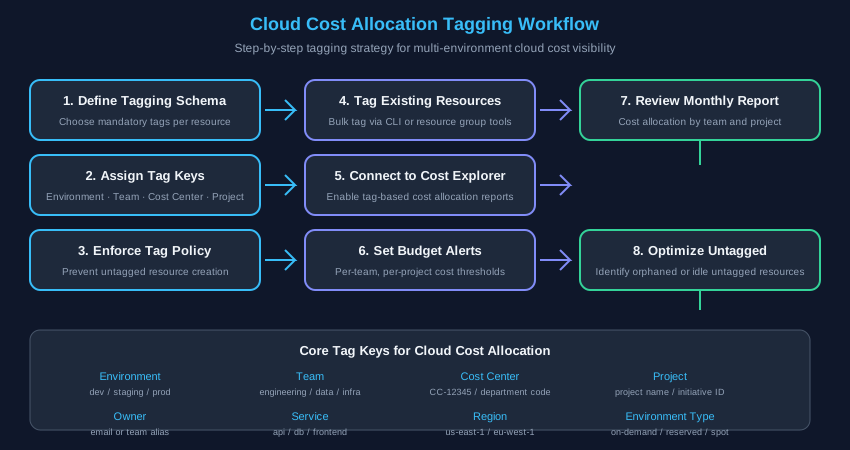
06Tagging Strategy[ COST ALLOCATION ]
Required Tag
Example
Purpose
Environment
production
Isolate prod vs. dev spend
Owner / Team
platform-eng
Chargeback by team
CostCenter
CC-12345
Finance allocation
Project
payments-api
Per-project visibility
ServiceName
postgres-main
Resource identification
Enforcement: Use SCPs or policies to block resource creation if mandatory tags are missing. Audit weekly with: aws resourcegroupstaggingapi get-resources