Cloud Cost Optimization — A Practical Guide
Learn how to assess, govern, and automate your cloud spending using the FinOps framework. Covers tagging strategy, Reserved Instances vs. Savings Plans, right-sizing, and a systematic waste detection process. The approach is tool-agnostic — applicable whether you run on AWS, Azure, or Google Cloud.
Introduction
Most organizations carry some level of unnecessary cloud spend without realizing it. Industry estimates consistently place organizational cloud waste at 15–32% of total cloud spend for typical enterprise environments (Gartner, Flexera 2024 State of Cloud Report). The challenge is not a lack of tools — it is a lack of visibility, governance, and engineering culture around cloud costs.
This guide covers the FinOps framework, tagging strategy, Reserved Instances vs. Savings Plans, right-sizing, and a systematic waste detection process. The approach is tool-agnostic — applicable whether you run on AWS, Azure, or Google Cloud.
The FinOps Framework — Crawl, Walk, Run
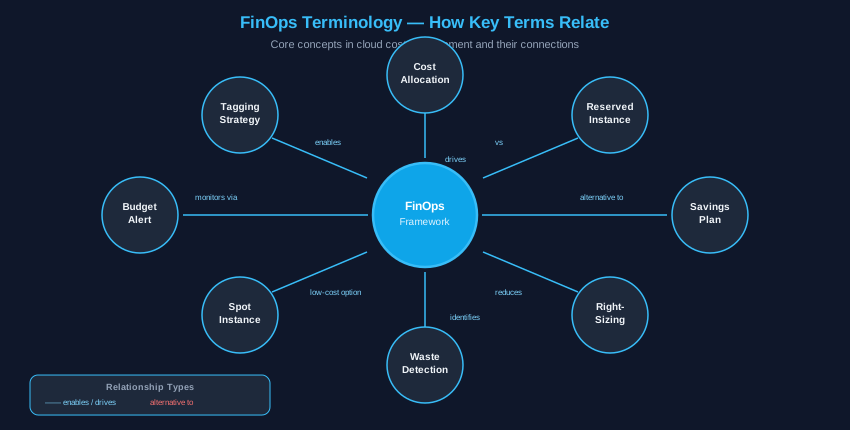
FinOps — short for Cloud Financial Management — is a practice that brings finance, engineering, and operations together to make informed cloud spending decisions.
Crawl — Learn and Assess
Start by understanding where your money goes. Establish a cost baseline over a 30/60/90-day window, per team or project. Tag every resource consistently. Identify idle and orphaned resources. The goal of this phase is pure visibility.
- Cloud cost assessment checklist
- Tagging strategy introduction
- Identifying idle and orphaned resources
Walk — Optimize and Govern
With visibility established, move to active management. Evaluate Reserved Instances and Savings Plans for your predictable workloads. Right-size compute resources based on actual utilization data. Implement budget alerts per team and project. Automate basic cost controls.
- Reserved Instance and Savings Plan evaluation
- Right-sizing compute resources
- Implementing budget alerts
- Automating cost controls
Run — Automate and Innovate
The mature FinOps practice embeds cost awareness into engineering culture. Continuous monitoring, predictive cost modeling, and automated optimization become standard practice. Cost decisions happen at the speed of business.
- Continuous cost monitoring
- FinOps as engineering culture
- Predictive cost modeling
Core Optimization Strategies
Right-Sizing Compute
Right-sizing means matching instance specifications to actual workload requirements. If average CPU is consistently below 40% over a 30-day baseline, the instance is likely oversized. Industry surveys consistently find that 60–70% of cloud instances are provisioned at 2× or more the required capacity, making right-sizing one of the highest-ROI optimization steps. Most cloud providers offer native tools (AWS Compute Optimizer, Azure Advisor, GCP Recommender) that suggest right-sizing opportunities automatically.
Reserved Instances vs. Savings Plans
Savings Plans offer the most flexibility — commit to a dollar amount of hourly spend on compute and receive discounted rates across instance families, sizes, and operating systems. Reserved Instances apply to a specific instance type in a specific availability zone and offer higher discounts for that exact match.
Recommendation: Start with a Compute Savings Plan for your baseline predictable workload, and use specific Reserved Instances for your most stable, critical workloads.
Spot Instances for Fault-Tolerant Workloads
Spot instances allow you to purchase spare compute capacity at a significant discount compared to on-demand pricing — discounts range from 60–91% on AWS EC2 Spot, up to 90% on Azure Spot, and up to 91% on GCP Spot/Preemptible VMs. Good use cases include batch processing, CI/CD build agents, data analysis pipelines, and non-production environments. Do not use spot for databases, APIs, or any workload requiring consistent uptime.
Storage Tiering
Major cloud providers offer multiple storage tiers optimized for different access patterns. Hot storage serves frequent access; cool and archive tiers cost less but have retrieval tradeoffs. Implement lifecycle policies to automatically transition data through tiers — for example, from Hot → Cool → Glacier as data ages. This approach meaningfully reduces storage costs for appropriate datasets. Organizations that implement storage tiering policies typically achieve 30–50% savings on storage spend for infrequently accessed data.
| Tier | Access Pattern | Relative Cost |
|---|---|---|
| Hot / Standard | Frequent access | Baseline |
| Cool / Infrequent | Monthly access | Lower storage, retrieval tradeoff |
| Archive / Cold | Quarterly or less | Lower storage, slower retrieval |
| Glacier / Deep Archive | Annual or less | Lowest tier, strict retrieval constraints |
Tagging and Cost Allocation
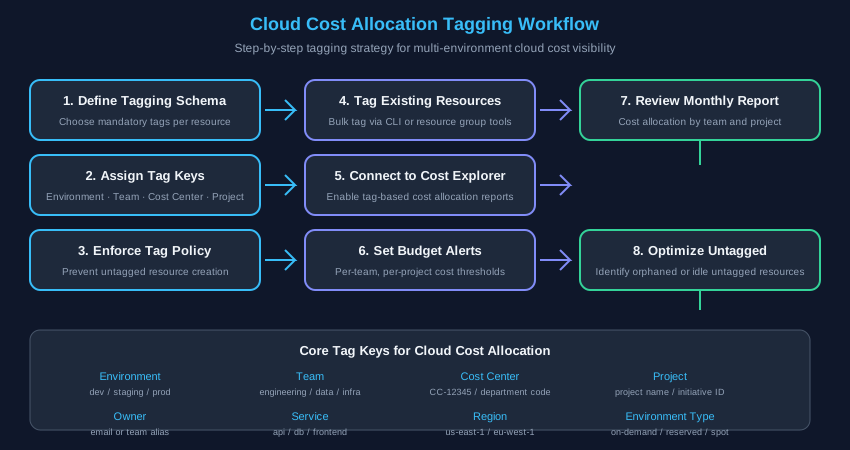
Consistent tagging is the foundation of effective FinOps. Without tags, cost allocation is impossible and waste goes undetected.
Core Tag Keys
| Tag Key | Example Values |
|---|---|
| Environment | production, staging, development |
| Team / Owner | engineering, data-team, [email protected] |
| Cost Center | CC-12345, department-alias |
| Project / Application | payment-api, user-service |
| Service Name | api-gateway, postgres-db |
| Region | us-east-1, eu-west-1 |
Enforcement Strategies
Enforce tags through policy — most cloud providers allow you to block resource creation if mandatory tags are missing. Bulk tag existing resources using CLI tools or resource group queries. Set governance policies that audit untagged resources weekly.
Automation and Tooling
- Scheduled shutdown of non-production instances outside business hours
- Storage lifecycle automation for S3 and blob storage
- Reserved Instance coverage analysis run monthly
- Budget alerts per team with escalation paths and automated responses to overruns